

Publishing news
Publishing news lets you write calmly and decide exactly when an article reaches sellers, and in which language. Each language has its own draft or published status, and one publish date schedules the whole article. Categories file it for the sellers’ filter, and the archive takes old news out of the feed without losing it.
What it does
Section titled “What it does”Sellers read the News in their own language. A half-translated German text or an announcement a week early is noticed. Old articles that never leave the feed bury the important ones.
Publishing news separates writing from publishing, per language. A seller sees an article only when all of these are true:
- It is not archived.
- Its publish date has come.
- The text in the seller’s language, or failing that the English text, is published.
From there:
- Every language is a draft until you publish it. Understanding when sellers see an article.
- A future publish date schedules the article. The publish date.
- Categories file every article for the sellers’ filter. The categories setting.
- Archive, restore and copy keep the feed current without losing anything. News in the archive.
- AI translation gives a first draft of each language. Language status and AI translation.
Every change to an article or category writes an event to the audit trail. The event names the user who acted.
Before you start
Section titled “Before you start”| Requirement | Details |
|---|---|
| Role | Super Admin, Admin or News Editor. All three can do everything described here. |
| Where | News in the staff console. |
| Categories | At least one category must exist. Create it under Categories. |
| Languages | Every configured language gets a text slot in every article. Languages are managed under Languages. |
| AI translation (optional) | Works only when AI translation is set up for comrce Hub. Otherwise translate by hand. |
| Cost | None. |
Understanding when sellers see an article
Section titled “Understanding when sellers see an article”| Article | Seller reads German | Seller reads English |
|---|---|---|
| English and German published, date today | German text | English text |
| English published, German draft | English text | English text |
| English draft, German published | German text | Not shown |
| Both published, date next Monday | Not shown until Monday | Not shown until Monday |
| Both published, archived | Not shown (except in favourites) | Not shown (except in favourites) |
| Both drafts | Not shown | Not shown |
How comrce Hub decides
Section titled “How comrce Hub decides”- Status is per language. Draft or Published, set with Apply translation for the active language.
- Fallback is English. If the seller’s language is not published, the published English text is shown. If neither is, the article is not shown.
- Editing unpublishes. Any change to a language’s title or text sets that language back to draft.
- The date is a day. The article appears from 00:00 UTC on its publish date, which is 01:00 or 02:00 German time.
- Order is by date. Sellers see newest publish dates first, and their favourites come first.
- Categories follow the same rules. A category badge or filter appears only when the category is visible. Its name must also be published in the seller’s language or in English.
What does not reach sellers
Section titled “What does not reach sellers”- Draft languages. Sellers of a draft language see the published English text instead.
- Articles with a future publish date.
- Archived articles, except in the favourites of sellers who starred them.
- Hidden categories, on cards and in the filter.
Setting it up in five steps
Section titled “Setting it up in five steps”-
Create the categories. In News › Categories, create categories such as Product updates. Publish their names and save.
-
Write the article. Select Add article and write title and text in English.
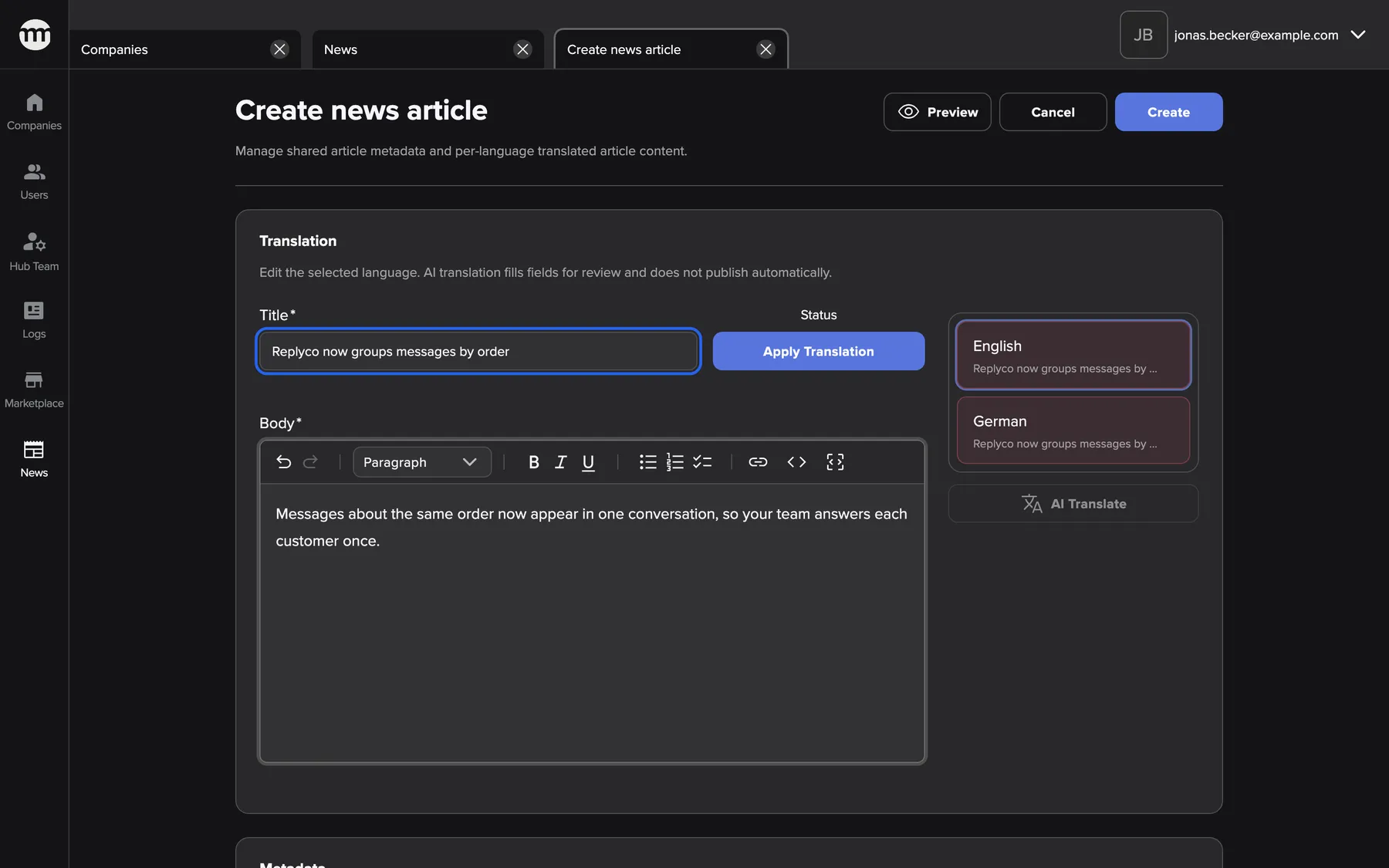
You write the English text first. It is copied into every language you have not edited yet. What this screenshot shows
- Screen
- Create news article
- Highlighted
- “Title”: title in the language selected on the left
- Also visible
- Buttons Create and Apply translation; Language list with English and German; Text editor with formatting toolbar
- Purpose
- Writing a new article
-
Translate and publish each language. Select each language and translate it, or use AI translate. Check it and publish it with Apply translation.
-
Set date and categories. Keep today or pick a later publish date, and tick at least one category. Add a cover if you like.
-
Save. Confirm the warning if a language is still a draft. Check the article with Preview in each language.
The timing for an important announcement is part of Tell all sellers about something new.
Every setting, explained
Section titled “Every setting, explained”
Every setting, explained
Section titled “Every setting, explained”The settings that decide visibility come first. Write or edit an article describes every control of the editor.
Language status and AI translation
Section titled “Language status and AI translation”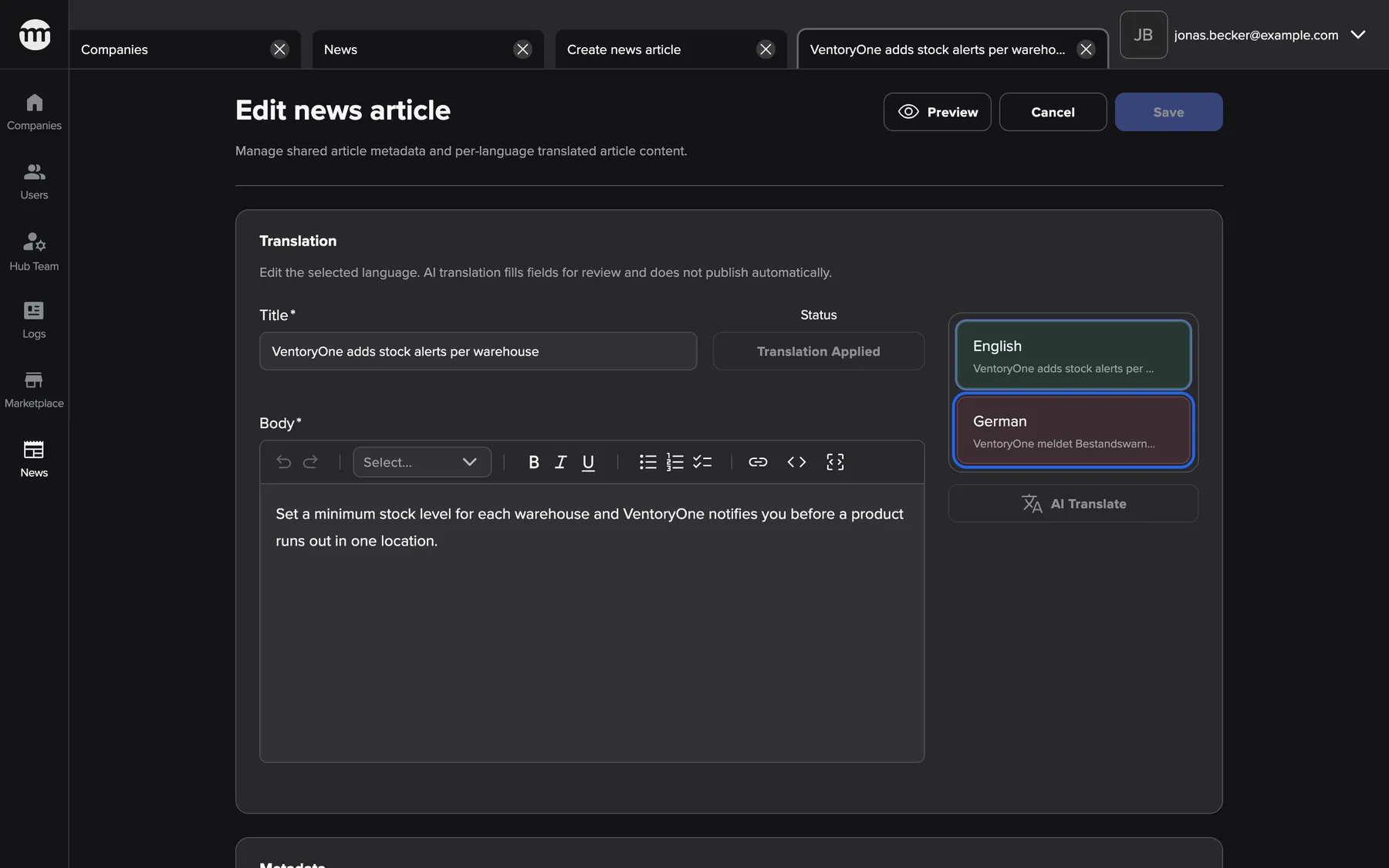
What this screenshot shows
- Screen
- Edit news article
- Highlighted
- “German”: switches the form to the German text
- Also visible
- English: Published; German: Draft; AI translate button
- Purpose
- Each language of an article has its own status


What this screenshot shows
- Screen
- Edit news article
- Highlighted
- “Save with draft translations?”: saves with drafts, or goes back to the editor
- Also visible
- German listed under Draft languages; Buttons Cancel and Save anyway
- Purpose
- The warning when you save with draft languages
Publish date
Section titled “Publish date”

What this screenshot shows
- Screen
- Create news article
- Highlighted
- sets the day sellers first see the article
- Also visible
- Calendar for March 2026; Today selected; Past days greyed out
- Purpose
- Scheduling an article with the publish date
| Publish date | Today is 10 March | Shown to sellers |
|---|---|---|
| 9 March (existing article) | After | Yes |
| 10 March | Same day | Yes, since 00:00 UTC |
| 11 March | Before | No, from 11 March 00:00 UTC |
| 16 March | Before | No, from 16 March 00:00 UTC |
Categories
Section titled “Categories”

What this screenshot shows
- Screen
- Edit news article
- Highlighted
- “Categories”: files the article under categories
- Also visible
- Publish date 5 March 2026; Five categories, Fulfilment ticked; Cover image card
- Purpose
- Settings that apply to every language
Category names, per language
Section titled “Category names, per language”

What this screenshot shows
- Screen
- Edit news category
- Highlighted
- “German”: switches to the German name
- Also visible
- English: Published; German: Draft
- Purpose
- Each language of a category name has its own status
Cover image
Section titled “Cover image”Other settings on this page
| Setting | What it does | Why |
|---|---|---|
| Title and text, per language | Title up to 180 characters and a Markdown text, both required in every language. Typing in English copies the text into languages you have not edited. | Sellers read the article in their language, and English is the safety net. |
How the settings combine
Section titled “How the settings combine”| Seller’s language published | English published | Publish date reached | Archived | Seller sees |
|---|---|---|---|---|
| Yes | Any | Yes | No | Their language |
| No | Yes | Yes | No | English |
| No | No | Yes | No | Nothing |
| Any | Any | No | No | Nothing yet |
| Any | Any | Any | Yes | Nothing, except in favourites |
Urgent or planned: the options are in Tell all sellers about something new.
News in the list and the archive
Section titled “News in the list and the archive”| Indicator | Meaning |
|---|---|
| Published badge | The language shown on the card is published |
| Draft badge | The language shown is a draft |
| Publish date in the future | Scheduled. Sellers do not see it yet. |
| Card in Archive | Archived and hidden from sellers |
The News list
Section titled “The News list”Shows active articles in the selected language with their status, newest publish date first, 8 at a time.
Why: one look tells you which language of which article is still a draft.


What this screenshot shows
- Screen
- News
- Highlighted
- “Add article”: opens an empty article editor in a new tab
- Also visible
- Language select; Buttons News, Archive and Categories; Article cards with publish date, language and status badge; Card buttons Preview and Edit
- Purpose
- Starting point for all News work
News in the archive
Section titled “News in the archive”Archive moves an article to the archive after a confirmation. It keeps its texts, categories and date.
Why: old news leaves the sellers’ feed without being lost.


What this screenshot shows
- Screen
- News
- Highlighted
- “Archive article?”: archives the article after you confirm
- Also visible
- Text on hiding the article and restoring it later; Buttons Cancel and Archive
- Purpose
- Taking an article out of the sellers' feed


What this screenshot shows
- Screen
- Archive
- Highlighted
- “Copy to Active News”: opens a new article filled in from the archived one
- Also visible
- Archived card: Webinar: getting ready for the holiday season; Restore button; No Add article button
- Purpose
- Working with archived articles
Restore
Section titled “Restore”Restore opens the article’s edit tab with today’s publish date. Saving makes it active again with "Article restored successfully".
Why: a restored article belongs at the top of the feed, so the date is renewed.


What this screenshot shows
- Screen
- Edit news article
- Highlighted
- “Publish date”: sets a new publish date; today is preselected
- Also visible
- Publish date: today; Category Webinars ticked
- Purpose
- Bringing an archived article back
Copy to active news
Section titled “Copy to active news”Copy to Active News opens a new article prefilled with every language, status, category and the cover, dated today. Saving creates a separate article, and the archived one stays.
Why: a yearly webinar or a recurring announcement starts from last year’s text.


What this screenshot shows
- Screen
- Create news article
- Highlighted
- “Create news article”: nothing to click: the page shows only a message
- Also visible
- Title and text filled in from the original; Language list with the original's status; Create button active right away
- Purpose
- Starting a new article from an archived one
News in the audit trail
Section titled “News in the audit trail”Among others, these events record changes:
- News article created
- News article updated
- News article archived
- News article restored
- News article deleted
Each names the user and the time, and updates are logged per language.
- An article disappeared → look for archived or deleted.
- A German text changed → look for an article update for language de.
- A machine translation was used → look for AI translated.
What you need to know
Section titled “What you need to know”
What you need to know
Section titled “What you need to know”| Topic | Fact |
|---|---|
| Source language | English, the fallback for every other language. |
| Schedule | Day granularity. There is no time-of-day setting. |
| Deleting a category | Removes it from every article. |
| Deleted articles | Permanent. Texts, categories and favourites are removed. |
| Links | Each language has its own link made from its title. Copies get a unique one. |
| Languages added later | Get a text slot in every article. Until it is published, sellers of that language see English. |
Frequently asked questions
Section titled “Frequently asked questions”
Frequently asked questions
Section titled “Frequently asked questions”General
Section titled “General”Does saving an article publish it?
Section titled “Does saving an article publish it?”No. Saving stores the texts and settings. Only Apply translation publishes a language. Sellers see an article only when their language, or English, is published and the publish date has come.
Who can publish News?
Section titled “Who can publish News?”Users with the Super Admin, Admin or News Editor role. All three can write, publish, schedule, archive, restore, copy and delete articles and manage categories. Other staff roles cannot open News.
Can I see the sellers’ News exactly as they see it?
Section titled “Can I see the sellers’ News exactly as they see it?”Use Preview on an article card in the News list, with the language select set to the seller’s language. It shows that language’s text, cover, date and categories. The sellers’ own News page also hides drafts and future articles.
Why does every article have a German text slot even if I only wrote English?
Section titled “Why does every article have a German text slot even if I only wrote English?”Each new article gets a text slot for every configured language. The slot is filled with the English text as a draft. Translate and publish it. Or leave it as a draft, so German sellers see the published English text.
Languages
Section titled “Languages”German sellers see the English article. Why?
Section titled “German sellers see the English article. Why?”The German text is still a draft, so the published English text is shown instead. Open the article, select German in the language list and check the text. Publish it with Apply translation, then save.
I fixed a typo and the language went back to draft. Is that expected?
Section titled “I fixed a typo and the language went back to draft. Is that expected?”Yes. Any change to a language’s title or text sets that language back to draft. That way a changed text is checked before sellers see it. Publish the language again and save.
Does AI translate publish anything?
Section titled “Does AI translate publish anything?”No. AI translate fills the title and text of the active language as a draft from the current English text. It replaces what was there, so check the result and publish the language yourself.
What happens to existing articles when a new language is added?
Section titled “What happens to existing articles when a new language is added?”Every article gets a text slot for the new language. Until that text is translated and published, sellers using the new language see the published English text.
Scheduling
Section titled “Scheduling”How do I schedule an article?
Section titled “How do I schedule an article?”Pick a later publish date in the Metadata card, publish the languages and save. The article stays in the News list and appears for sellers from 00:00 UTC on that day.
What time does a scheduled article appear?
Section titled “What time does a scheduled article appear?”At 00:00 UTC on the publish date. That is 01:00 in German winter time and 02:00 in summer time. There is no setting for a time of day.
Can I publish an article with yesterday’s date?
Section titled “Can I publish an article with yesterday’s date?”No. New publish dates cannot lie in the past. An existing article can keep an older date unchanged, which is how older articles keep their place in the feed.
Why was my date of today refused just after midnight?
Section titled “Why was my date of today refused just after midnight?”The server compares dates in UTC. Shortly after midnight German time it can still be the previous day in UTC. The date you pick may then count as past. Pick the next day, or try again later.
Categories
Section titled “Categories”Why can I not save without a category?
Section titled “Why can I not save without a category?”Every article must have at least one category, because sellers filter the News by category. Tick a category in the Metadata card. Hidden categories are offered too.
What happens to articles when I delete their category?
Section titled “What happens to articles when I delete their category?”The category is removed from all of them. Articles left without any category show no badge. They must get a new category the next time they are saved.
Archive and copy
Section titled “Archive and copy”What is the difference between Archive and Delete?
Section titled “What is the difference between Archive and Delete?”Archive hides the article from sellers and keeps everything for a later restore or copy. Delete removes the article for good, with its texts in every language, its categories and sellers’ favourites of it.
Why did Restore change the publish date?
Section titled “Why did Restore change the publish date?”Restoring sets the publish date to today, so the article appears at the top of the feed again. You can pick another future date in the edit tab before saving. The article is restored when you save.
When should I use Copy to Active News instead of Restore?
Section titled “When should I use Copy to Active News instead of Restore?”Copy when you want a new article based on an old one, such as next year’s webinar. The old one stays archived. Restore when the same article should come back unchanged.
Can sellers still read an archived article?
Section titled “Can sellers still read an archived article?”Only sellers who marked it as a favourite, because their favourites list includes archived articles. Everyone else no longer sees it in the News.
How do I find out who archived an article?
Section titled “How do I find out who archived an article?”Open Logs and filter by the event type News article archived. The event shows the user and the time. Restores and deletions have their own event types.
Are translations logged?
Section titled “Are translations logged?”Yes. Each saved language writes its own article update event, and AI translations write an AI translated event. So you can see which language was changed and when.
Troubleshooting
Section titled “Troubleshooting”
Troubleshooting
Section titled “Troubleshooting”| Symptom | What to check |
|---|---|
| An article does not appear for sellers | Archived? Publish date in the future? Is the seller’s language or English published? |
| German sellers see English | The German text is a draft. Publish it. |
| English sellers see nothing although German is published | English is a draft. There is no fallback to other languages. |
| "Select at least one category." | Tick at least one category. |
| "Publish date cannot be in the past" | Pick today or later, and mind the UTC day boundary. |
| "An article with this or a similar title already exists. Choose a different title." | Another article in that language has a very similar title. Change it. |
| A restored article is still in the archive | The edit tab was closed without saving. Restore again and save. |
| "AI translation could not be completed." | AI translation is not available. Translate by hand. |
| A category badge is missing on an article | The category is hidden, or its name is not published in the seller’s language or English. |
| An article lost its category | The category was deleted. Assign a new one. |